Marketing > E-Mail Lists > Dynamic E-Mails
Dynamic E-Mails
You can access Dynamic E-Mails from the Menu Marketing > E-Mail Lists. There are two sections of this page. The top is for E-Mail Lists and the second half of the page is for Dynamic E-Mail Lists. Dynamic E-Mails are useful for sending e-mail reminders to students who have already registered for a class for example.

Creating a Dynamic E-Mail List
Steps to send a reminder e-Mail to students who purchased tickets for Ticket Event Annie.
-
Create a Name for your Dynamic E-mail List. I added Annie Reminder.
-
Add a Description.
-
For Customers who have not placed an order the Date Range doesn't apply here. That is useful for sending an e-mail to customers who haven't purchased anything lately.
-
Select a Date Range that would apply for your class or event.
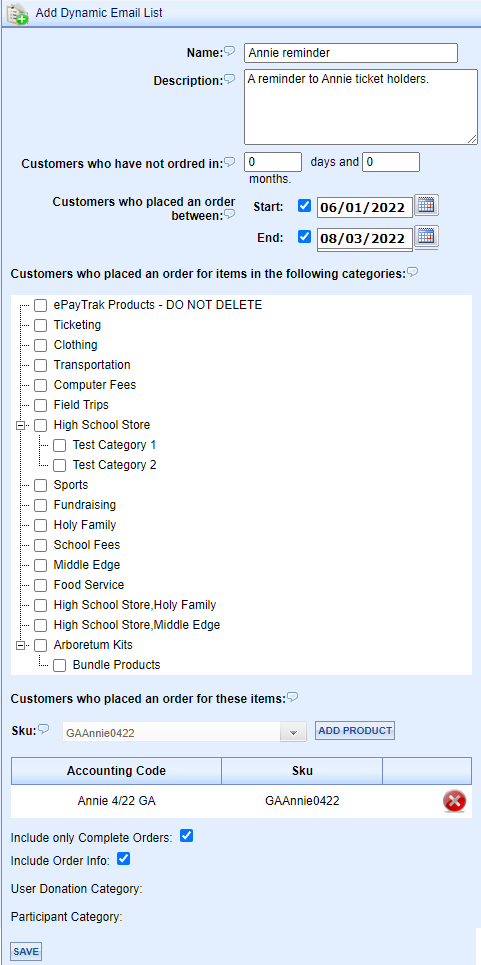
Under the Date Range, you will see a list of all Categories on your ePayTrak site. You can select an entire category if you wish, but in this case, we are going to select the SKU for the Annie ticket event.
-
Click the Down-Arrow to select your Sku. Click the 'Add Product' button.
-
You will likely want to include only Complete Orders (you don't want to send a reminder to people who haven't purchased the product yet) and you might want to include the Order info.
After clicking 'Save', you will notice your Dynamic E-Mail on the list as shown below.
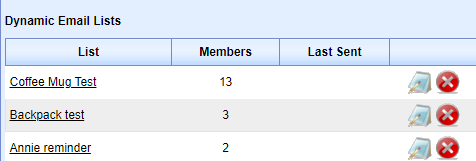
Notice there are 2 Members of your Dynamic E-Mail group. Many ticket purchases are done anonymously and names will not often appear.
Similar to E-Mail Lists, you can click the blue 'Edit' button to edit your Description or click the red 'X' to delete.
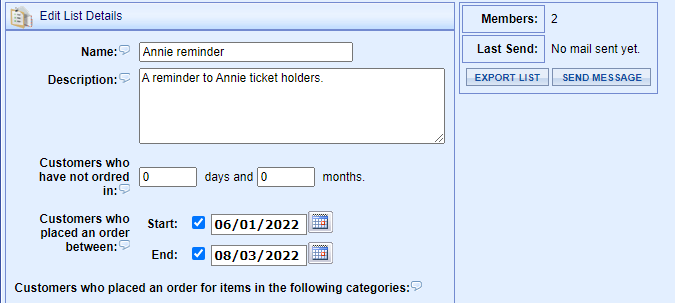
I clicked 'Edit' as shown above. At the right, you'll see how many members who will receive the e-mail. You can Export that List as a .csv file which you can view or save. Or if your site is configured for sending messages, the Send Message is available.
Note: You must also cancel an order after issuing a refund. Students who had called to cancel the class will still appear as a Member if only a partial refund was given. You can adjust the order items in the Order Manager to remove students from this list who had partial refunds.
If you want to send your e-mail with the original order information, check the checkbox next to Include Order Info. Depending on your choice of template, your reminder can look like the original order with a note attached. This might be most helpful in sending class notification reminders.
Sending your Dynamic E-Mail
-
Click the Send Message button.
-
Select the Template you wish to use. You can create a custom template that includes an attachment! Or you can select Blank Message and create a unique message as I have done.
-
Click Next.
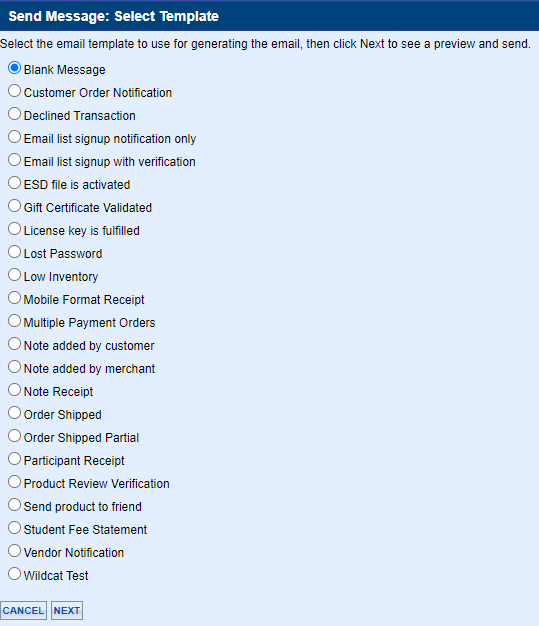
You will see this screen.

-
Select Preview.
-
Select Send.
You can include e-mail attachments to your dynamic e-mail message.
-
Attachments are added to the e-mail template, before you begin sending the e-mail.
-
Go to Configure > E-Mail > Templates. You will see the screen below.
Please consult ePayTrak personnel prior to adding an attachment. The settings in this section are instrumental in what e-mail receipt your customers/students will receive.

-
Click the blue Edit button next to Attachment Order Confirmation. You will see the following screen.

-
Click the 'Browse' button to locate the file on your computer. Select your file and press the Enter Key.
-
You can remove a file by clicking the 'Remove File' button. Only one attachment per template is available.
-
This should be helpful to send communications to your students, or sending evaluation surveys after a course is completed perhaps.
related topics:
-
e-Mail Lists - Other types of e-mails explored.
2022 © Edutrak Software, LLC