Ticket Events > E-Mail Receipts
Ticket Events E-Mail Receipts
Assigning Skus to an E-mail Template
We have made recent improvements, so when you create your Ticket Event using the new Ticket Wizard, the product is automatically added to the Mobile Format receipt. The latest release with the Ticket Wizard allows you to exclude the Ticket Event from the Participant receipt automatically, and you no longer have to do it manually as long as you use the Ticket Wizard for your Ticket Event!
For reference, I left the following information in the Help files.
Go to Configure > E-mail >Templates.
You will see a list of all templates as shown below.
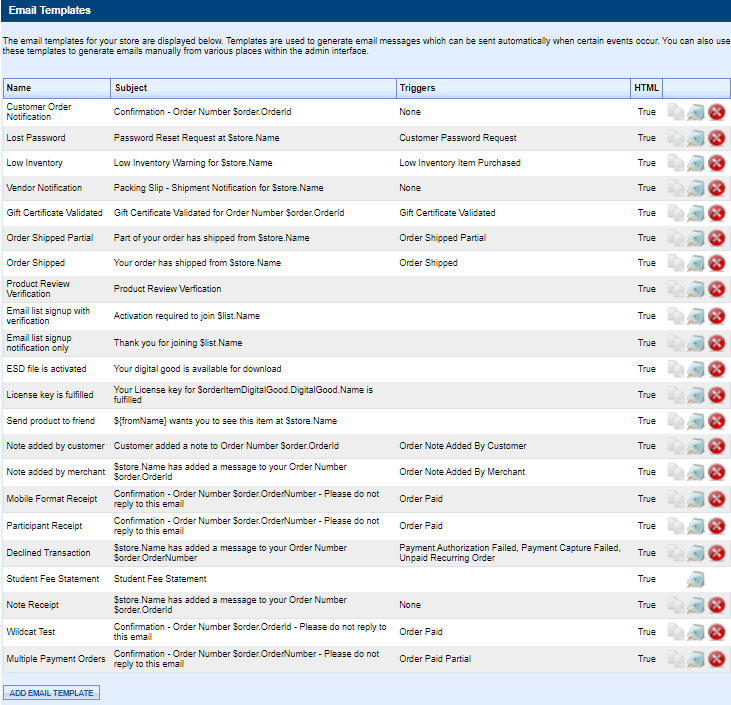
The customer will see a bar coded format receipt in that e-mail.
If you want the customer to only receive one receipt for a ticket events (highly recommended) then you can follow the steps below.
Excluding Products from e-Mail Receipts
First, identify which receipt is the default receipt. Look for the triggers of Order Paid.

Click the blue edit button next to the Participant Receipt.
Scroll down to the exclusion section. Note that Annie 4/22 GA has already been added.
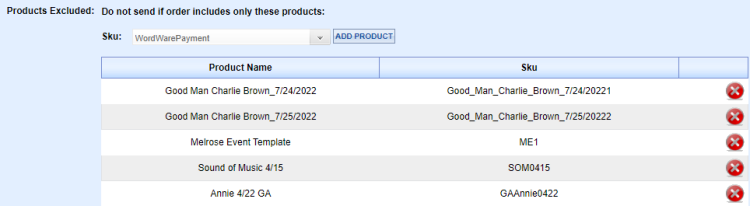
Click the down-arrow to select your product by Sku. In this case it will be MP0501. The most recently added Skus will appear at the bottom. Products that are archived are not available for this drop-down. You can also enter the Sku manually instead of searching the drop-down.
Customers who purchase tickets for the Annie performance will not receive the default Participant Receipt, only the ticket receipt with barcode.
This is a great new feature and saves you considerable time.
Related Topics:
-
General Admission Ticket Sales Products - Details for creating general admission ticket sales.
2022 © Edutrak Software, LLC